

I’ll be honest with you: I walked into this review skeptical.
The Pixel 10a launched in March 2026 with the same Tensor G4 chip, the same cameras, the same 8GB of RAM, and basically the same design as last year’s Pixel 9a. On paper, it read like a product that forgot to show up.
But I’ve been using it as my daily phone for two full weeks now — commuting, shooting photos, handling calls and email, watching video, the whole deal. And my conclusion surprised me.
Here’s the full, unfiltered breakdown.
✅ Quick Specs at a Glance
| Spec | Google Pixel 10a |
|---|---|
| Price | $499 (128GB) / $599 (256GB) |
| Display | 6.3″ pOLED, 120Hz, 3,000 nits |
| Chip | Google Tensor G4 |
| RAM / Storage | 8GB / 128GB or 256GB |
| Rear cameras | 48MP wide + 13MP ultrawide |
| Battery | 5,100mAh |
| Charging | 30W wired, 10W wireless |
| Water resistance | IP68 |
| Software updates | 7 years guaranteed |
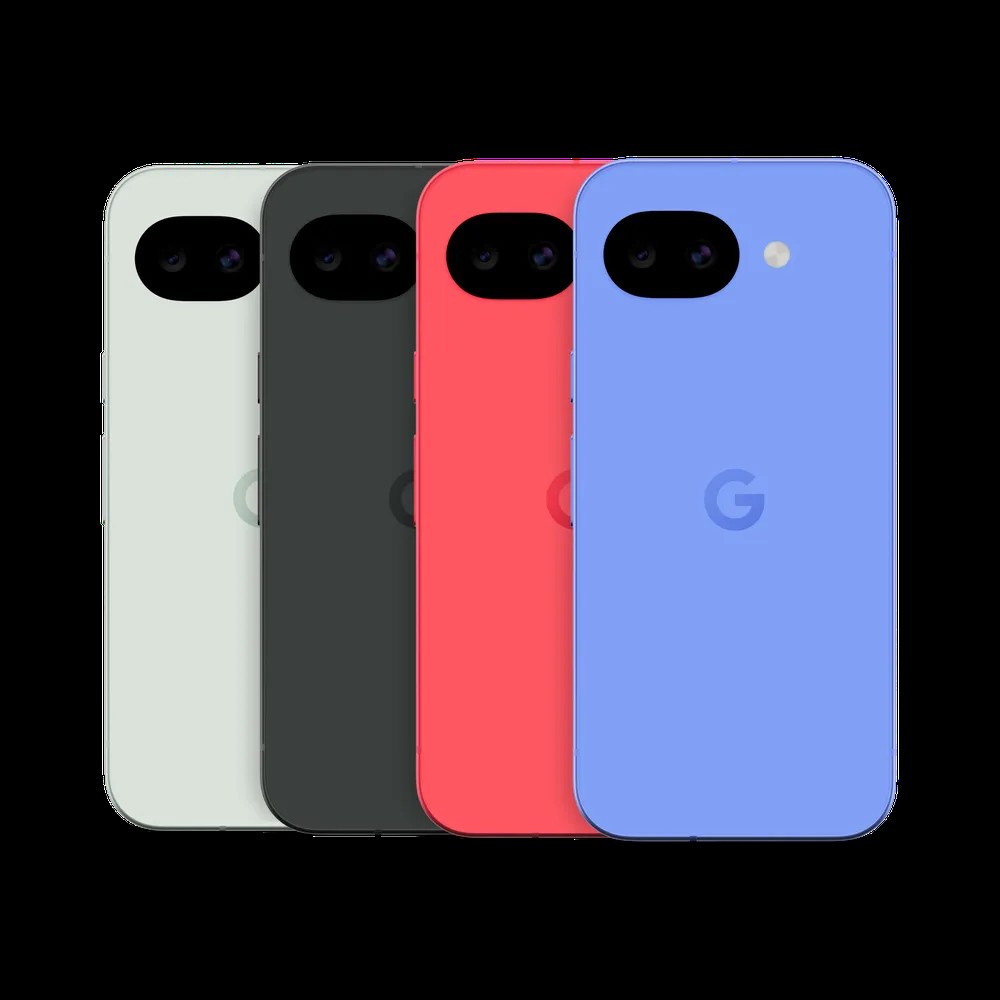
| Colors | Obsidian, Fog, Berry, Lavender |
The One Design Change That Actually Matters
Let me start with something that doesn’t show up in spec sheets but I noticed within five minutes of picking this phone up.
The back is completely flat.
No camera bump. No ridge. No wobble when it sits on a table. Google took the approach of entirely removing the camera bump, making a phone that lies completely flat on surfaces. TechCrunch It’s a small thing that most phone makers gave up on years ago — but after months with flagships that teeter on their camera modules, having a phone that just sits still felt genuinely refreshing.
The rest of the design is familiar: aluminum frame, a 6.3-inch screen, a matte plastic back. The plastic back gets flak from reviewers, but after two weeks I find it comfortable and easy to grip. It’s also lighter than it looks. I wore it in my shirt pocket for entire work days without noticing the weight.
The Pixel 10a is technically thicker than its predecessor at 9mm compared to the Pixel 9a’s 8.9mm Android Central — but that 0.1mm difference is genuinely not something you’ll ever feel.
Display: One of the Best Screens at This Price
This is where the Pixel 10a earns its keep loudly.
The Pixel 10a’s 6.3-inch pOLED display hits 3,000 nits peak brightness, and the difference is immediately obvious when you’re outside in direct sunlight. Tom’s Guide I’ve been testing this in bright spring afternoons, and I have no complaints about outdoor legibility.
The 120Hz refresh rate makes everything feel smooth — scrolling, animations, typing. In 2026, it is frankly unbelievable that the iPhone 17e is still stuck at 60Hz Tom’s Guide while the Pixel 10a offers a noticeably slicker experience for $100 less.
For watching video, the screen is vivid without being oversaturated. Colors look natural. I streamed Netflix and YouTube for about an hour each night and never found myself wishing for a bigger or better display.
At this price, you would normally have to make tradeoffs on display quality. The Pixel 10a doesn’t ask you to.
Camera: Pixel Magic Still Holds Up
The camera is the area where Google’s software advantage shows most clearly — and where the Tensor G4’s limitations matter least.
The setup is a 48MP main sensor paired with a 13MP ultrawide. No telephoto, no dedicated zoom lens. Google’s computational photography pipeline delivers excellent dynamic range, low-light shots, and reliable portraits Droid Life from this dual-camera system.
I shot photos in a variety of situations over two weeks: indoor lighting at restaurants, bright outdoor scenes, overcast afternoons, a quick sunset at the park. The main camera consistently produced clean, usable shots without much manual input. Colors were accurate. Detail in shadows was better than I expected.
The ultrawide is where this phone pulls away from the iPhone 17e, which has only a single rear lens. The ultrawide lens allows you to capture landscapes, tight group shots, and other unique perspectives that simply aren’t possible with the iPhone 17e’s lone rear camera. Tom’s Guide I used it constantly for interior architecture shots and wide outdoor scenes, and it delivered.
Two specific AI camera features I kept coming back to:
Auto Best Take. When shooting group photos, the phone automatically analyzes multiple frames and suggests the one where everyone looks best. I used this at a small gathering and it flagged the shot where everyone was actually smiling. Not revolutionary, but quietly useful.
Camera Coach. A Gemini-powered feature that gives real-time feedback on lighting and composition. When I was shooting in backlit conditions, it flagged the issue and suggested moving my subject. More helpful than annoying.
Where the camera does fall short: low-light video. When I filmed short clips at dim restaurants or evening scenes, the footage was noticeably grainy and stabilization wasn’t as smooth as I get on a flagship. For static photos in low light, the results were good. For video in low light, manage expectations.
Performance: Good Enough, With Honest Caveats
Here’s where I’ll give you the straight story.
The Tensor G4 is a two-year-old chip in a 2026 phone. The Pixel 10a has noticeable hiccups here and there — apps do stutter at times, games don’t hit the same frame rates you’d expect from a flagship, and sometimes the camera is a touch slower to load after a break than you’d want. Droid Life
In two weeks of real use, I noticed these moments a few times. Never to the point of frustration, but they were there.
For the things most people actually do — messaging, email, web browsing, streaming, light photography, Google Maps, Google Pay — the Pixel 10a handles all of it without drama. I never felt like the phone was struggling with my actual daily routine.
Where it shows its limits: demanding mobile games, multitasking between five or six heavy apps, or editing long video clips. If any of those are core to your daily phone use, you’ll feel the chip.
The fingerprint sensor under the screen worked reliably. Face unlock is fast. Nothing to complain about there.
Battery: A Genuine Strength
The 5,100mAh battery is one of the most convincing arguments for this phone.
Over two weeks, my typical day looked like: morning commute with music and maps, several hours of email and Slack, lunch with photos, afternoon browsing and YouTube, evening messaging. I ended most days with 30–45% battery remaining. I never plugged in before bed.
On heavier days — more video, navigation, calls — I still got comfortably through the day. I only hit below 20% battery once, after an unusually demanding travel day.
The 30W wired charging is slower than what you’d find on a Samsung mid-ranger or a OnePlus at this price. In my testing, going from 20% to full took about 70 minutes. Not ideal for quick top-ups, but fine as an overnight charge.
Wireless charging is supported at 10W — convenient, but slow. Use it at your desk or nightstand, not before you run out the door.
One thing worth flagging: there is no charger brick included in the box Android Central. Google provides only a USB-C cable. If you don’t already own a compatible charger, budget another $20–30 for that.
AI Features: Genuinely Useful, Not Just a Buzzword
The Pixel 10a is the most AI-integrated phone you can buy at $499, and most of the features actually earn their place.
Call Screen. Screens incoming calls automatically. I turned on a spam calls filter and had three calls screened in two weeks that I’m confident were robocalls. It works quietly in the background without requiring any setup after the initial toggle.
Live Translate. I had one phone call with a family member who speaks Spanish while I was borrowing this as my daily device. The real-time translation displayed on screen while we talked. It wasn’t perfect, but it was genuinely useful for getting the gist of the conversation.
Circle to Search. Press and hold the home bar, draw a circle around anything on screen, and Google searches for it. I used this most often on restaurant menus and product names in videos. It’s become a reflex.
Magic Eraser. Touch up photos by removing unwanted objects or people in the background. Worked well for simple removals; struggled with complex backgrounds.
The one AI feature the Pixel 10a doesn’t get is Magic Cue, which is exclusive to the Pixel 10 flagship lineup. If you don’t know what Magic Cue is, you probably won’t miss it.
How It Compares to the Competition
At $499, the Pixel 10a’s main rivals are:
iPhone 17e ($599): Apple charges $100 more, offers a faster A19 chip, MagSafe support, and 256GB base storage. But you get a 60Hz display, no ultrawide camera, and weaker AI features. The Pixel 10a wins on display, camera versatility, battery life, and price. The iPhone 17e wins on raw performance and MagSafe ecosystem. Tom’s Guide
Samsung Galaxy A56 ($499): Similar price, but weaker long-term software support (4 years vs. 7) and a less polished AI experience. The A56 has a telephoto lens, which the Pixel 10a lacks.
Pixel 9a (~$430 on Amazon): This is the trickiest comparison. If you can find the Pixel 9a on sale for $430 or lower, that may be the smarter buy Android Authority — it has the same chip and cameras. Once stock runs out and discounts dry up, the 10a is the clear choice.
Who Should Buy the Pixel 10a
Buy it if you:
- Are upgrading from a Pixel 8 or older Android phone
- Want the best camera and AI experience at $499
- Plan to keep your phone for 4–5+ years (7 years of updates means a lot here)
- Are switching from iPhone and want to sample the Pixel experience without paying flagship prices
- Don’t play demanding mobile games or edit video regularly
Skip it if you:
- Already own a Pixel 9a — there’s no meaningful reason to upgrade
- Need the fastest possible chipset for gaming or heavy multitasking
- Want a telephoto zoom lens (the Pixel 10 base model goes on sale for $699–749 periodically)
- Need MagSafe-compatible accessories as part of your daily setup
My Verdict After 2 Weeks
The Pixel 10a is not an exciting phone. Nothing about it will make anyone’s jaw drop.
But exciting and good are different things. After two weeks of actual daily use, I found a phone that took dependably good photos, lasted all day without worry, had a display I genuinely enjoyed, and got smarter over time thanks to software features that actually worked.
Google nearly perfected the $500 smartphone formula with the 9a, and the 10a is that same phone again, now with a better design, improved display brightness, and new AI features. Android Authority
At $499, it’s the best value-for-money Android phone you can buy in the US right now. Just don’t expect it to surprise you.
You Might Also Like
- Galaxy S26 Ultra vs Google Pixel 10 Pro: Which One Is Worth the Price Hike in 2026?
- Moving from Android to iOS in 2026: The Complete Seamless Data Transfer Guide

스마트폰과 IT 기기를 오랫동안 직접 구매하고 사용해온 일반 사용자입니다.
화려한 스펙보다 “실제로 쓸 만한가”를 더 중요하게 봅니다.
갤럭시와 아이폰을 병행 사용하면서 느낀 점, 설정하면서 막혔던 것들,
부모님 폰 세팅해드리며 깨달은 것들을 솔직하게 정리하고 있습니다.
특히 스마트폰을 어렵게 느끼는 분들, IT 초보자, 부모님 세대를 위한
쉽고 실용적인 가이드에 집중합니다.
“나도 해봤는데 이렇더라” — 그 한마디가 이 블로그의 시작이었습니다.
📩 문의 및 제보: kim.wasp@gmail.com